Challenges hosts face in accommodation operations · EP. 03
Host operationsWhen to share the address and when to reveal door codes
Introduction
Directions and door-opening information are needed at different times. Decide what to send and when so guests can plan confidently and hosts can feel comfortable.


At a glance
- Guests want directions before departure, while hosts may hesitate to send door codes early.
- Neighborhood information, the route to the entrance and door codes need different release times.
- Use clear names such as “Guide viewing code,” “Building entrance code” and “Room door code.”
- If check-in changes, update the message and the physical lock settings together.
- Tell guests when they will receive information that is not yet available.
Learn more
Guests want to plan; hosts want to be careful
“When will I receive the address?” Guests want to know how to travel from the airport and which entrance to approach with their luggage. Hosts wonder whether they should send door codes while the previous guest is still staying. Both concerns are reasonable. The information each person needs, and when they need it, is slightly different.
Give each kind of information a release time
Grouping everything as “Check-in information” makes you decide what to send each time. Separating it creates a useful routine.
| Information | When it is needed | Example |
|---|---|---|
| Neighborhood and nearby station | Before or after booking, during trip planning | A seven-minute walk from Mangwon Station |
| Exact address and route to the entrance | The day before departure through arrival day | Alley photo and blue gate |
| Building and room door codes | Around check-in time | Numeric access codes |
Even with separate release times, include everything a guest actually needs to reach the accommodation. Apply the same rule to photos. Removing a code from the text does little if it remains visible in an entrance photo.
Name each code by what it opens
Calling both the guide viewing code and the lock code “the code” makes it hard for guests to know which value to enter where. Label them “Guide viewing code,” “Building entrance code” or “Room door code.”
This code opens the accommodation guide. The instructions for opening the building entrance and room door are listed separately in the check-in information.
If there are two doors, explain which code to use at each door in order.
Check the lock when you change the time
Approving early check-in or an extension requires more than changing the time in a message. If the lock has a timed access window, adjust that too. If you change the code without updating the guide, the guest sees the wrong value. Check the message, lock settings and time communicated to the cleaning team together.
Open the guide as a guest would
Open the link on a phone and check whether the address, building photo and entrance directions form a clear sequence. Instead of leaving unavailable information blank, say when it will arrive: “We will send the entry instructions at 2 p.m. on check-in day.” That one line can ease a guest’s uncertainty.
How to use stayV Host
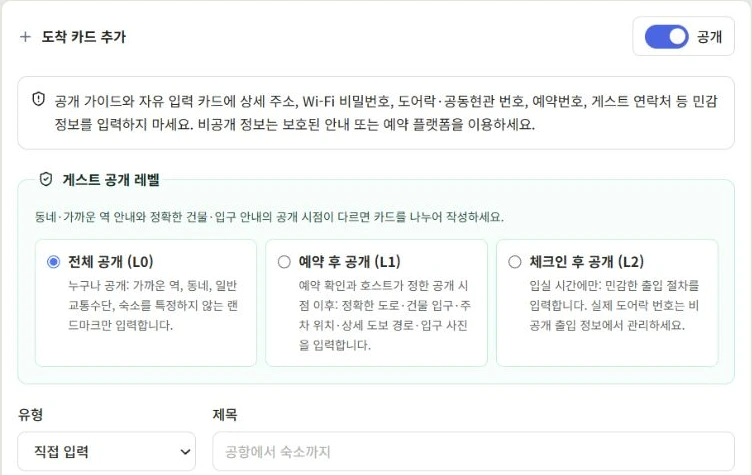
Use arrival cards in stayV Host to gather entrance photos and walking directions. Choose who can see each card—anyone, booked guests or guests after check-in—and check the sequence in the guest preview after saving. Manage door codes in their dedicated fields, rather than in cards or photos.
See the stayV screens
Read next
Previous: Is the TV problem a usage issue or a fault?
Next: Do you negotiate every early check-in and late check-out?
Related help · stayV Host public help: iCal reservations and essential guidance · Today’s tasks, preparation schedules and reservation messages.