
How to use stayV Host · EP. 27
Using stayV HostCopy an existing property to create another guide
At a glance
Reuse rules and appliance instructions for a second property. Learn which copied details need review and which information must be entered again.


For a second property, reusing your first guide’s rules and appliance instructions can save writing time. A copy starts you with reusable guidance, but its photos and location may differ from the new space. Let’s adapt the copied draft.
At a glance
- Copy an existing stayV property to reuse rules and instructions.
- Select the source in Copy existing property and give the copy a new name.
- Location, Wi-Fi, contacts, reservation connections and access codes need new setup.
- Check photos, appliance explanations and rules for original-property details.
- Publish and open the new property’s guest link.
Learn more
1. Choose a source and check your remaining limits
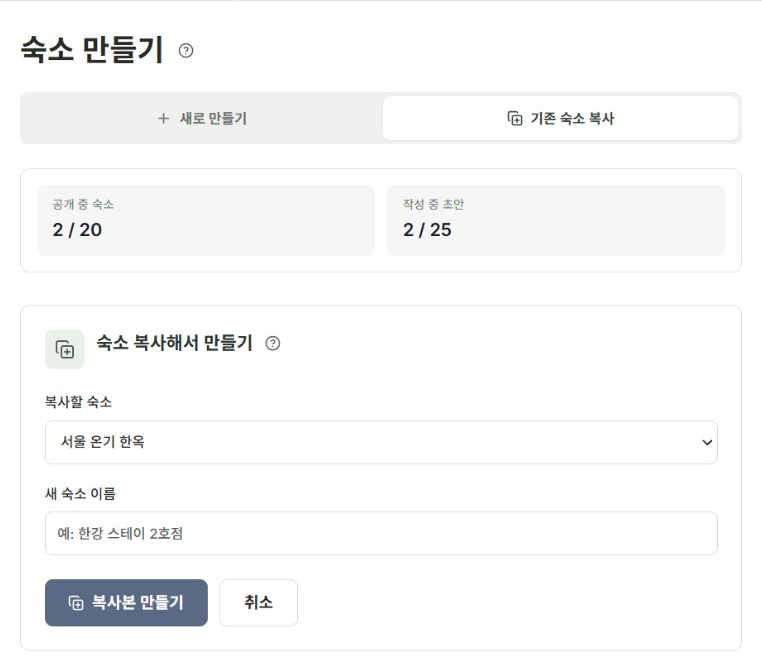
Go to Property management → Copy existing property. Published-guide and draft limits are separate, so check how many you currently use.
This copies your stayV property. It does not import an Airbnb listing’s text or photos.
2. Give the copy a new name
Enter a name and select Create copy. The new property is a separate draft and does not inherit the original’s publication state or guest link.
Editing it leaves the original unchanged. Save and manage each separately.
3. Re-enter information that is not copied
Set these again for the new property:
- Exact address, map location and parking information.
- Wi-Fi name and password.
- Host personal contact details.
- Airbnb property and reservation-calendar connections.
- Guide Code, building, door-lock and key-box codes.
- Translations and visit/click records.
An empty field is not a reason to copy the original password. Prepare values appropriate to the new property.
4. Compare copied content with the actual space
Review the introduction, stay information, photos and rules. An old remote photo for a different air-conditioner model or another building’s entrance can confuse guests.
Check-in times and cleaning or rubbish rules may differ too. Search wording for the original property’s name, nearby station and floor number.
5. Review essentials and languages
Save Basic, Location, Photos, Host and Stay information. Adapt Arrival, Amenities, Rules and FAQ. For multiple languages, check that translations use the new information.
Copying reduces input time but does not replace publication checks. Review photos and QR codes in the checklist too.
6. Open the new guest link
After publishing, open the new property’s link. Check the name and link together to avoid sending it to guests of the original property.
Copies count towards the draft limit. If you accidentally create duplicates, compare them and continue with the one you intend to use.
Check your progress
- You gave the copy a name distinct from the original.
- You set location, contacts, Wi-Fi and reservations for the new property.
- Photos and the new guest link match the actual accommodation.
Availability and things to know
Copying is available on Free and Plus, subject to each plan’s draft limit.
Read next
Episode 26 · Use guest visits and clicks to improve guidance
Episode 28 · Manage publication, pauses, archiving and restoration