
How to use stayV Host · EP. 26
Using stayV HostUse guest visits and clicks to improve guidance
At a glance
Use visit and click records alongside real guest questions to choose what to improve. Review one property and period, then refine one instruction at a time.


If you are unsure what to improve after making a guide, compare visit and click records with questions guests actually ask. Use the same property’s records for a chosen period to refine individual explanations instead of judging success from one number.
At a glance
- Select a property and period in Guest visits on the dashboard.
- These numbers record guide use, not bookings or revenue.
- Compare frequently opened guidance with real questions.
- Change one title, photo or explanation, then check the guest view.
- Compare periods of similar length afterwards; treat small counts as a reference.
Learn more
1. Open Guest visits
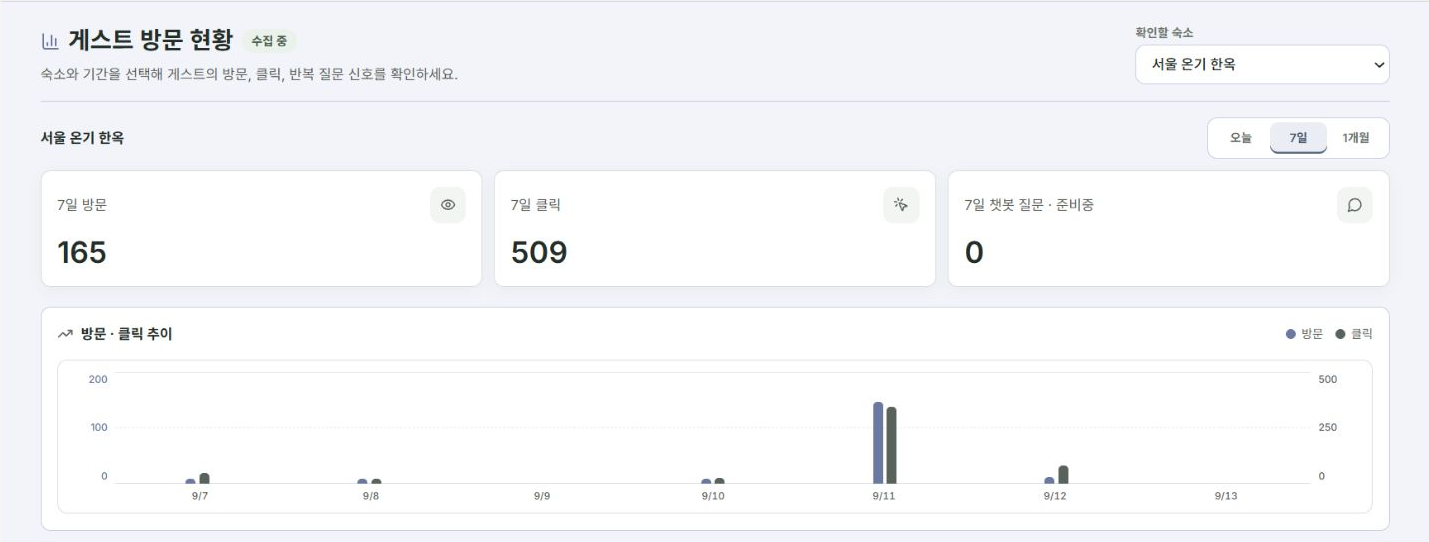
Find Guest visits on the Dashboard. It shows guide openings and interactions rather than revenue or payouts.
For several properties, choose the one you want to improve rather than relying on the combined total.
2. Use the same property and period
Choose Today, Last 7 days or Last month. Check that trends and frequently opened items use the same property and period.
Visit and click counts do not measure guest numbers, bookings, revenue, satisfaction or message readership. More clicks do not establish that bookings increased.
3. Compare popular items with real questions
If the air-conditioner card is opened often and questions keep arriving, review its photos and wording. High use alone does not show poor guidance; guests may simply need it often.
Similarly, do not remove emergency contacts because they are rarely opened. Some information is needed only in urgent situations.
4. Choose one improvement
Start by clarifying a title, replacing an appliance photo or dividing long text into steps. Edit appliance guidance in Amenities, repeated questions in FAQ and departure tasks in Check-out.
Arrange items by when guests need them rather than automatically moving the most-clicked item to the top.
5. Check the changed guest view and translations
Save changes, then republish in Publication if translations need updating. Check the actual guest link and note the date of the change for later comparison.
Compare periods of similar length. Changes in guest numbers or seasons also affect results, so do not attribute everything to the guide. Small counts offer limited evidence.
6. Revisit sparse records after a few days
For an empty screen, check the selected property and period first. A recently shared guide may have little activity. Revisit after a few days and note questions received in the meantime.
Check your progress
- You reviewed one property and a consistent period.
- You compared records with real guest questions.
- You chose one improvement and checked the guest view.
Availability and things to know
Guest visit and click analytics are available on the paid Plus plan.
Read next
Episode 25 · Help guests use taxi cards and taxi-app links
Episode 27 · Copy an existing property to create another guide