
How to use stayV Host · EP. 25
Using stayV HostHelp guests use taxi cards and taxi-app links
At a glance
Prepare a Korean address guests can show a driver. Check a practical vehicle stopping point and follow the guest screen through to a taxi app.


International guests may struggle to show a Korean address to a taxi driver. A readable address card and a route to a taxi app can help. Let’s check where vehicles can stop and what the driver should see.
At a glance
- A Taxi card shows the address in large text; taxi-app links open apps such as Uber.
- Check the address and drop-off point in Location.
- If cars cannot reach the entrance, use a practical stopping point.
- Taxi-app links appear on Plus after booked-guest arrival guidance opens.
- Test the app and destination on a phone.
Learn more
1. Check the driver address and drop-off point
Open Location in the editor. If the entrance is in an inaccessible alley, prepare a safe stopping point on the main road.
There are two functions. Address-display taxi cards are available on Free and Plus; external taxi-app links are available on Plus.
2. Know when taxi-app links appear
Even on Plus, taxi functions using the property’s location appear after that reservation’s arrival guidance (L1) opens. Opening the guide or entering a shared property code does not unlock all taxi functions.
Use the road-name address for the driver and omit room numbers. Check the drop-off point separately if it differs from the entrance.
3. Showing a card differs from calling a taxi
A taxi card displays a destination; it does not call a car. Guests use an external taxi app to request one. Explain the distinction clearly.
The destination differs when travelling to the property or from it to an attraction. Read the destination and check for room numbers or entry codes that should be omitted.
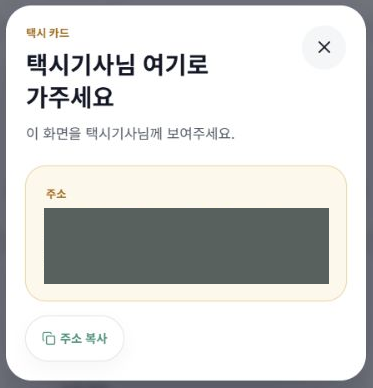
4. Recheck the destination from the app button
Under Routes / Taxi, first choose Go to property or Depart from property. Some buttons, such as Request in Uber, pass the destination automatically. Others sit under Copy address, then request.
For copied addresses, paste the value into the app’s destination field. Check both endpoints before choosing a vehicle. Viewing a route alone does not book a car.
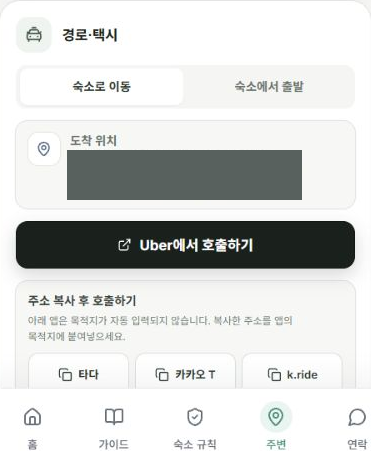
5. Test on a phone
Open the guide and tap the app button on your phone. A phone without that app may show an installation screen. A computer is less suitable for checking this.
Check the card address too, so guests can show it to a driver if the app does not open.
6. Explain what the function helps with
Vehicle selection, dispatch, fares and payment happen in the taxi app. stayV displays the address and links to that app.
Keep arrival directions available separately for guests who do not use taxis. Taxi apps are optional; registering with one is not required to view the guide.
Check your progress
- You checked an address and a place where vehicles can stop.
- You understand taxi cards, map directions and app links.
- You checked the app and destination on a phone.
Availability and things to know
Taxi address cards are available on Free and Plus. External taxi-app links are available on Plus after the booked guest’s arrival guidance (L1) opens.
Read next
Episode 24 · Show maps and nearby tourism information
Episode 26 · Use guest visits and clicks to improve guidance