Challenges hosts face in accommodation operations · EP. 01
Host operationsWhen repeated guest questions take over your day
Introduction
How do I turn on the TV? How do I open the door? Each reply is short, but the interruptions add up. Learn how to keep an answer you can use again.


At a glance
- Repeated questions are tiring because they interrupt your work, even when the reply is short.
- Separate questions about using something, finding the instructions and an actual fault.
- Use the guest’s words in headings, such as “The TV won’t turn on.”
- Include what to try first and how to contact you if it still does not work.
- If something is broken, the host needs to check it rather than just send instructions.
Learn more
A day of interruptions is harder than one reply
You are arranging the cleaning schedule when a message arrives: “The TV won’t turn on.” After replying, you return to work, only to hear that a door is locked. Each task is quick, but by evening you have made little progress on what you intended to do.
Finding an old answer in a conversation and copying it also becomes cumbersome when you do it repeatedly. Instead of trying to eliminate every question, start by making the next reply a little easier.
Sort questions into three types
Repeated questions can have different causes. Scan recent conversations and label each question. A few days of messages may be enough to see what to improve first.
| Label | What happened | What to improve |
|---|---|---|
| Explain | The guest does not know how to use something | Improve the usage instructions |
| Find | Instructions exist, but the guest could not find them | Change the heading or location |
| Act | Something is actually broken | The host needs to check it |
Treating all three with written instructions can delay repairs. Treating all three with a visit can exhaust the host.
Use the guest’s words in the heading
“The TV won’t turn on” connects directly to a guest’s question more clearly than “Multimedia equipment instructions.” Another question does not always call for a longer guide. If the guest could not find the remote, add its location. If the pictured appliance is different, replace the photo first.
Add a next step after “Read the instructions”
A reply that only says “Please check the manual” can leave the guest stuck. Explain what to do next.
Please check the remote-control photo in the TV guide I sent. If you follow the instructions and the screen still does not work, tell me what message appears on it in this conversation.
Do not ask a guest to open an appliance or climb up to inspect something. Separate checks the guest can safely make from work the host must handle.
Save one question you received today
Choose a question you have received at least twice recently. Write the question, the first thing to try and how to contact you if that does not work. Next time, see whether that answer was enough and improve the one sentence that was missing. Add the date when you change a photo or explanation to help avoid sending an old answer.
How to use stayV Host
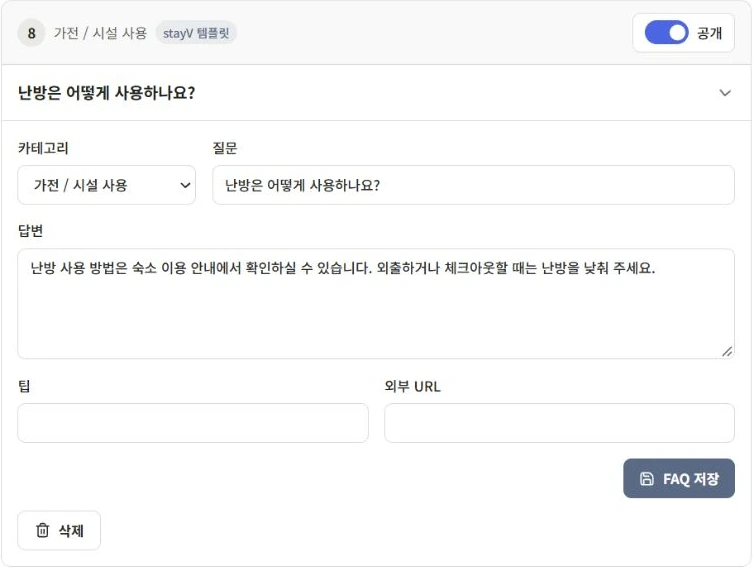
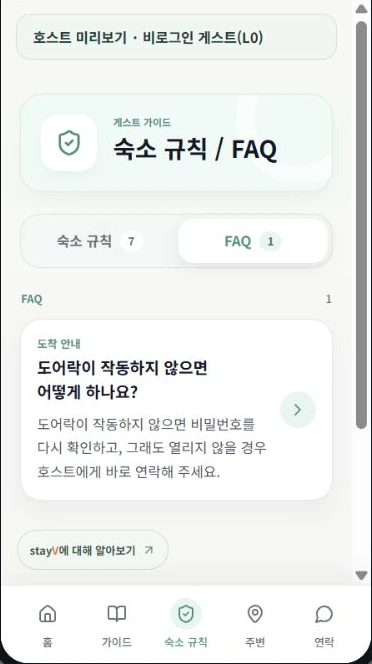
In stayV Host, you can organize repeated questions as FAQs and appliance instructions as amenity cards. Send the relevant guide link when a question arrives, then use the guest preview after saving to check that the heading and answer are easy to find. Start with one question you received today.
See the stayV screens
Read next
Next: Is the TV problem a usage issue or a fault?
Related help · stayV Host public help: Arrival, stay-information and amenity cards · Today’s tasks, preparation schedules and reservation messages.