How to use stayV Host · EP. 33
Using stayV HostExport direct reservations and blocks to external calendars
At a glance
If a direct stayV reservation still leaves dates open in Airbnb, connect stayV's export link to block them there too.


A direct reservation recorded in stayV may leave Airbnb dates open. Connecting stayV-created reservations and blocks to an external calendar can block them there too. This is the reverse of Episode 16; start by checking which link belongs where.
| Episode 16 | This article | |
|---|---|---|
| Direction | Airbnb → stayV | stayV → Airbnb or another service |
| Link to copy | Airbnb export link | stayV export link |
| Where to paste | stayV Calendar integration | Airbnb’s Connect to another website |
At a glance
- Send stayV-created direct reservations and blocks to external calendars.
- Copy the property link in stayV Calendar export.
- Paste it into Airbnb’s Connect to another website field.
- Imported Airbnb or Booking.com events are not exported again.
- Check that dates are blocked correctly in Airbnb afterwards.
Learn more
1. Know what is exported
Only direct reservations and manual blocks created in stayV are sent. Imported Airbnb, Booking.com, Vrbo and Agoda events are excluded. Guest names and host notes are excluded too; dates are shared.
This does not automatically display Airbnb reservations on other platforms. Configure each platform’s calendar connections separately for cross-platform blocking.
2. Copy the property’s export link
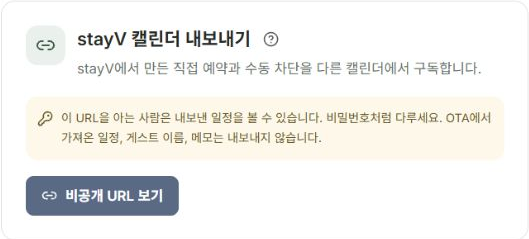
Select the property in Reservation schedule and access management and open stayV Calendar export. Confirm the property, then copy the link from Show private URL.
Anyone knowing the URL can view the property’s calendar. Paste it only into the external calendar’s field, keeping it out of posts and messages.
3. Paste it into Airbnb’s import field
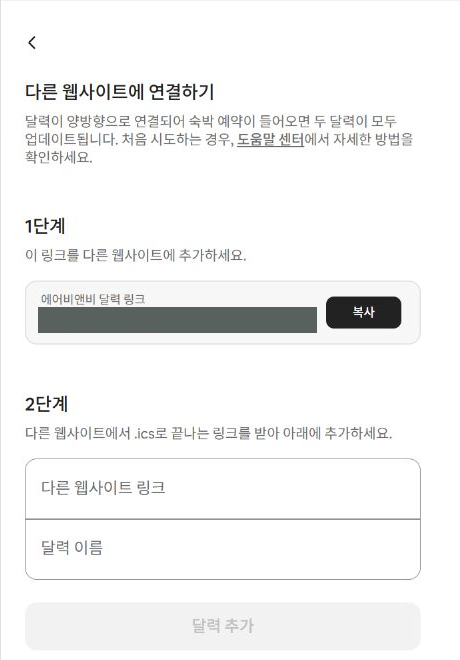
In Airbnb, open Calendar → Select listing → Availability → Connect calendars → Connect to another website. This time, paste the stayV link into the field that imports another service’s calendar.
Choose a recognisable name such as “stayV direct reservations.” Confirm the listing, connect and check whether the dates are blocked.
4. Compare dates in Airbnb
After Airbnb reads the link, compare each direct reservation and block with stayV. Platforms can differ in blocking dates or displaying check-out days.
Do not assume Airbnb preparation time between bookings is replicated identically. Inspect the dates actually blocked.
5. Know refresh timing and link replacement
Updates depend on the external service’s reading schedule. Wait and recheck after changing dates.
Generating a new stayV URL stops updates through the old one. Replace it in connected external calendars. Events already read by an external service do not automatically disappear.
6. Manage the two directions separately
Keep names and properties clear for Airbnb → stayV and stayV → Airbnb connections. Imported Airbnb reservations being excluded from export is intended behaviour.
Calendar connections transfer dates only, not prices, payments or guest verification. Check the source booking platform and external calendar for same-day changes.
Check your progress
- You know only stayV-created direct reservations and blocks are exported.
- You pasted the correct property’s URL into an external import field.
- You checked the blocked dates in the external calendar.
Availability and things to know
You need the paid stayV Plus plan and a host account able to manage the external calendar.
Read next
Episode 32 · Record property condition and inspection photos