
How to use stayV Host · EP. 21
Using stayV HostPrepare reservation messages and record delivery
At a glance
Choose property message templates, adapt them to a reservation and send them in the Airbnb conversation. Includes a check-in message example.


Writing the same message before each check-in can lead to omitted addresses or times. Prepared property templates let you focus on checking the reservation and sending the message. Let’s choose wording, send it in Airbnb and record delivery in stayV.
At a glance
- stayV prepares copyable text; it does not send messages for you.
- Choose wording for confirmation, check-in or check-out.
- Check the property, dates, times, link and code instructions before copying.
- Paste into the actual booking-platform conversation and send it yourself.
- Mark it as sent in stayV only after sending.
Learn more
1. Open reservation messages
Select the property in Reservation schedule and access management and go to messages. On mobile, use the Messages tab. Check the property name and dates, then choose information needed now.
2. Templates and today’s message tasks differ
Property templates cover six points: after confirmation; three days before, the day before and the day of check-in; and the day before and after check-out. These are wording categories.
Today’s tasks in Property operations separately list reservation messages to handle, such as confirmation, the day before arrival, arrival day and departure day. Six templates do not mean six messages are automatically sent.
3. Read before copying
Check the property, dates, times, guide link and Guide Code instructions against this reservation. Shorten lengthy text while preserving essential entry information.
A day-before-arrival message might say:
Here are your check-in details for tomorrow. Check-in starts at 3 p.m.
Address: (property address) / Nearest station: seven minutes on foot from Mangwon Station Exit 2
The guide below includes arrival photos, Wi-Fi and appliance instructions. If asked for a code, enter the confirmation code from your Airbnb reservation details.
(Guide link)
Door-entry instructions become available in the guide at check-in time. Please let us know here if your arrival is delayed.
Keep essential details such as the address and entry method in the message itself as well as the guide.
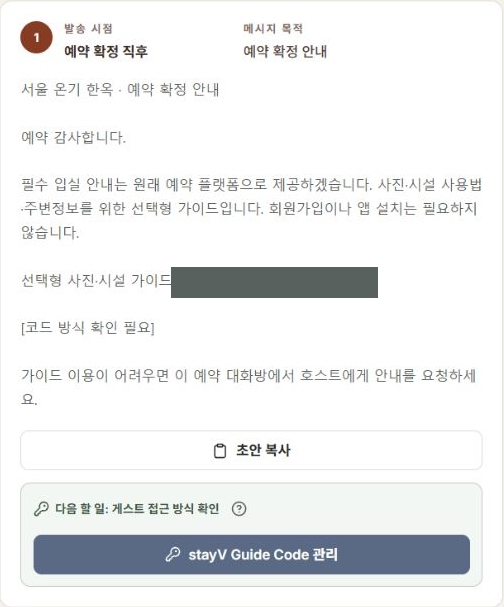
4. Send through the original booking platform
Paste the text into the correct Airbnb or other booking conversation. Recheck the recipient and content, then send it yourself.
When several conversations are open, check the recipient again. Pasting text without pressing Send can also leave the message unfinished.
Using Airbnb’s scheduled quick replies requires setup in Airbnb. Copying stayV text does not change that schedule.
5. Mark it as sent afterwards
Once you confirm delivery, select Mark as sent for the relevant stayV item. Template-editing cards and delivery-status items are separate; check that you are recording the reservation you just messaged.
This is your own record that you sent it. stayV does not send to Airbnb or verify whether the guest read it.
6. Resend when a reservation changes
If dates, entry times or codes change, check whether the old message remains accurate. A previous Sent status does not mean the update was delivered.
Property operations’ today’s tasks shows messages needing attention. Keep essential arrival and departure information in the booking conversation in case the guide cannot be opened.
Check your progress
- You checked the property and recipient reservation.
- You sent essential guidance in the original booking conversation.
- You recorded Sent in stayV afterwards.
Availability and things to know
Reservation message preparation and delivery records are available on the paid Plus plan.
Read next
Episode 20 · Manage Airbnb confirmation codes and stayV Guide Codes